

By: [email protected]
Published January 23, 2025 at 06:39 AM
Obsidian "Actions" - Google Calendar Syncing
Learn how to sync your Google Calendar with Obsidian for automatic event updates in your notes, making productivity smoother and more effortless!
Obsidian "Actions" - Google Calendar Syncing
Introduction
Yes, get hype, it's another Obsidian post!
This one is pretty straightforward and solved a pretty big first world problem for me, so I thought I'd share it.
The Problem
As I've discussed before, I use Obsidian for all sorts of notes. One of the big ones is my TODO lists.
I'm generally pretty happy with my setup for this, but one issue I had is that if I have a calendar event like a meeting or call, I'd have to add it manually to my TODO list.
This isn't really a massive deal but it has actually gotten me a few times! Particularly in messing up the details like the time or the location.
The Solution
What I thought was interesting about this was I didn't actually think there was a good fix for this. GMail accounts are pretty high security so it's kinda a pain nowadays to integrate with them.
THAT SAID - I totally forgot about ICS links!
If you're not sure what that is, I don't blame you. I didn't really understand them until I started looking into this. You might have learned about these in school but different story.
The TLDR is that ICS links are a way to export your calendar events - with authentication - to a file that you can then import into your Obsidian vault.
If you use Google Calendar like I do, it's super easy to get one for each of your calendars:
1. Go to Google Calendar
2. Click the "Settings" button
3. Click "Integrate calendar"
4. Copy the link in the "Secret address in iCal format" section
5. Save the link!

Official Instructions - https://support.google.com/calendar/answer/37648?hl=en
NOTE this link is SENSITIVE. Anyone who has it will have access to your calendar so be careful!
Scripting Some Scripts
So at this point we have our events (theoretically), now we have to deal with the fun part of actually getting and formatting them.
I went with the simplest idea I could think of - a Python script.
To give a quick idea of what I did:
1. Go through a particular set of notes / select a subset of notes to update
    - *there may be a few considerations here as far as processing time / cost depending on how many notes you have and where you plan on running this*
2. Parse `MM-DD-YYYY` from the note's filename and convert it to a date
    - *this will vary based on your note naming convention*
3. Remove any existing calendar section from the note's content
    - *this is to avoid duplicates / handle updates and similar*
4. Fetch and parse ICS data, filtering events for the note's date
5. Format those events into simple markdown entries
I'll get into specific code later - there's a repo - but the idea here is pretty straightforward; you can do it in a few lines of code. Our friends over at Chat GPT could probably handle this super well if you're less inclined to do it yourself or have some specific needs.
How To Run It?
The other biggest obstacle to this is actually where to run it.
Particularly if you mainly use Obsidian on mobile, this could be a bit of a pain.
I had a pretty easy solution for this though - GitHub Actions!
My Obsidian vault is in a GitHub repo - see my Obsidian Git iOS Blog Post for more on that but if you use Obsidian across devices and like projects like this I'd highly recommend it. I'm able to run all sorts of scripts and tools on Obsidian across devices for things just like this.
With GitHub Actions, I can add the script to my repo - .script dir to hide it - and run it on my repo with a script like this:
name: Sync Calendar with Daily Notes

on:
  # Run every 4 hours
  schedule:
    - cron: "0 */4 * * *"
  # Allow manual runs from the Actions tab
  workflow_dispatch:

jobs:
  update-calendar:
    runs-on: ubuntu-latest
    steps:
      - name: Check out repository
        uses: actions/checkout@v3

      - name: Set up Python
        uses: actions/setup-python@v4
        with:
          python-version: "3.12"

      - name: Install Python dependencies
        run: |
          pip install requests recurring-ical-events icalendar

      - name: Run the calendar sync script
        env:
          GOOGLE_CALENDAR_PERSONAL: $
          GOOGLE_CALENDAR_HOLIDAYS_US: $
        run: |
          echo "Starting calendar sync at $(date -u '+%Y-%m-%d %H:%M:%S UTC')"
          python .scripts/update_calendar.py
          echo "Finished calendar sync at $(date -u '+%Y-%m-%d %H:%M:%S UTC')"

      - name: Configure Git
        run: |
          git config --global user.name 'github-actions[bot]'
          git config --global user.email '41898282+github-actions[bot]@users.noreply.github.com'

      - name: Commit and push with retry
        run: |
          # Fetch the latest changes
          git fetch origin main

          # Stage changes
          git add .

          # Only commit if there are changes
          if git diff --staged --quiet; then
            echo "No changes to commit"
            exit 0
          fi

          git commit -m "BOT: update daily notes with Google Calendar events [$(date -u '+%Y-%m-%d %H:%M:%S UTC')]"
          git push origin main
Very simply, this just runs the script and commits / pushes the changes every few hours or on manual runs.
You could run this on every commit but I'm not updating my calendar that much and GitHub Actions does charge by the minute so worth being a bit stingy.
NOTICE AS WELL - the usage of secrets here for the calendar links. Again, these are sensitive and should be kept secure. Do so however best makes sense for your setup.
More fleshed out version coming in a moment but this is the basic idea.
The Results
A lot of code and trial runs later and we will finally get our notes "magically" updating as the lords of productivity would have it:
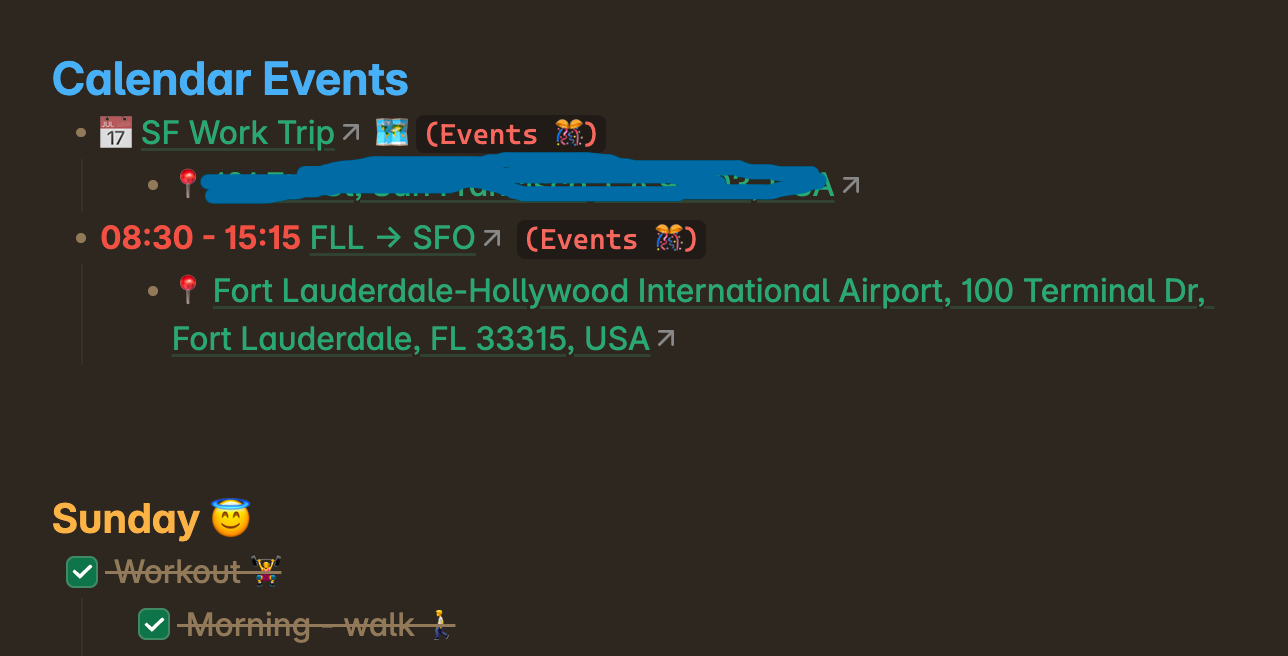
I can't tell you how happy this made me.
Took a lot of tweaking to get it updating well, rendering times well and all that but I'm pretty happy with the result at this point.
The Repo
If you're interested in actual code, this repo is available. Tried to document it well and include some potentially common edge cases that might come up!
Just for a quick description:
main.py- More similar to the script I use myself
- More complex version with more features, formatting, etc.
- Supports multiple calendars, exclusion list, multiple events per day, etc.
- Some optimizations / cost saving for GitHub Actions
- Fun emoji 😏💪🤙
simple.py- More bare bones / basic version
- I'd recommend using this if you're just getting started
- Could also be easier to take this if you plan on modifying it
Take a look and let me know if you have any suggestions, thoughts or questions!
Conclusion
You are likely thinking "this is a lot of work" and you're right!
This is completely unnecessary! Full honesty is that I wrote down the wrong flight info in my notes a few weeks ago and almost missed my flight, so I used that experience as reflection for how to avoid this in the future.
I'd say I fixed it and am honestly pretty happy with the result.
What do you think? Total overkill? Should I just go back to pen and paper, or is this at least a little sick?
Let me know what you think!
Resources
Comments
No comments available :/
Leave your thoughts! 💭
Tags
Git
Obsidian
Productivity
Python
Tips and Tricks

Version Unavailable
/
unavailable
Copyright 2026 © Naztech Inc. and Daniel Nazarian