
By: [email protected]
Published November 20, 2024 at 11:02 PM
Tailscale - Self Hosted Cloud Storage
Transform your Mac into a personal cloud server without losing your sanity - a no-nonsense guide to self-hosted storage that doesn't require a computer science degree.
Tailscale - Self Hosted Cloud Storage
Introduction
After experimenting with various self-hosted cloud storage solutions like Seafile and Nextcloud (both excellent options!), I realized I needed something simpler.
While these platforms offer robust features and polished user interfaces, they caused me a lot of headaches. I was constantly setting up and configuring them again and again, HTTPS/SSL was a pain, and it was overall taking more time than it was worth.
That’s when I discovered a game-changer: Tailscale combined with SMB sharing. It’s a lightweight, no-frills solution that just works.
If you’re looking for an easy way to set up your own personal cloud storage without dealing with the complexities of a full-featured platform, read on!
What is Tailscale?
Tailscale is a zero-config VPN that creates a secure connection between your devices, making them act like they’re on the same local network—no matter where they are. Built on WireGuard® technology, Tailscale offers both security and efficiency, without the headache of traditional VPN setups.
It's the backbone of my self-hosted solutions now. You don't have to use Tailscale, but I've found it to be the simplest solution to my problems and others like them. View my iPad as a code editor post for more examples on how I use it.
You can think of it as the “connect anything, anywhere” solution for your devices.
With Tailscale, even your Mac can double as a NAS (Network Attached Storage) for file sharing.
I opted for Tailscale because it was the simplest solution to my problem! I've used countless other services and programs to help make self hosted solutions - i.e., give my device a public DNS, handle dynamic IPs from my ISP, and accessible to other devices on the internet.
I won't even bother listing the other services I've used in the past cause Tailscale solves this problem so well!
Tailscale is free for personal use and has tons of other features and uses as well for example Tailscale SSH.
Setting Up Your Mac as a NAS
So a NAS is just a fancy way of saying a server that can store files and share them across devices - what we now call cloud storage.
You can use any device or NAS solution you want, I will be running through this on my Mac server as that's the hardware I have available.
While Macs aren't typically known for their hardware or server capabilities, they're actually a great solution for this.
Apple includes SMB file sharing out of the box on all Macs. That link goes into more detail on how to set it up but I'll run through it here as well to show how simple it is!
Prerequisites
Here's what you'll need to get started: - A Mac that will act as your file server - again this can be any device you want, just find the appropriate software for it. - Lots of great solutions out there especially for Windows or Linux - TrueNAS and Unraid are two great examples. - Tailscale installed and configured on all devices you want to connect. - As mentioned earlier, you don't have to use Tailscale, but I've found it to be the simplest solution. - Ideally an Ethernet connection for the best performance.
Let's Get Started!
Follow these steps to transform your Mac into a lightweight personal cloud:
-
Install Tailscale: Download and install Tailscale on your Mac and any other devices you want to connect. Follow the simple setup wizard to create your private network.
-
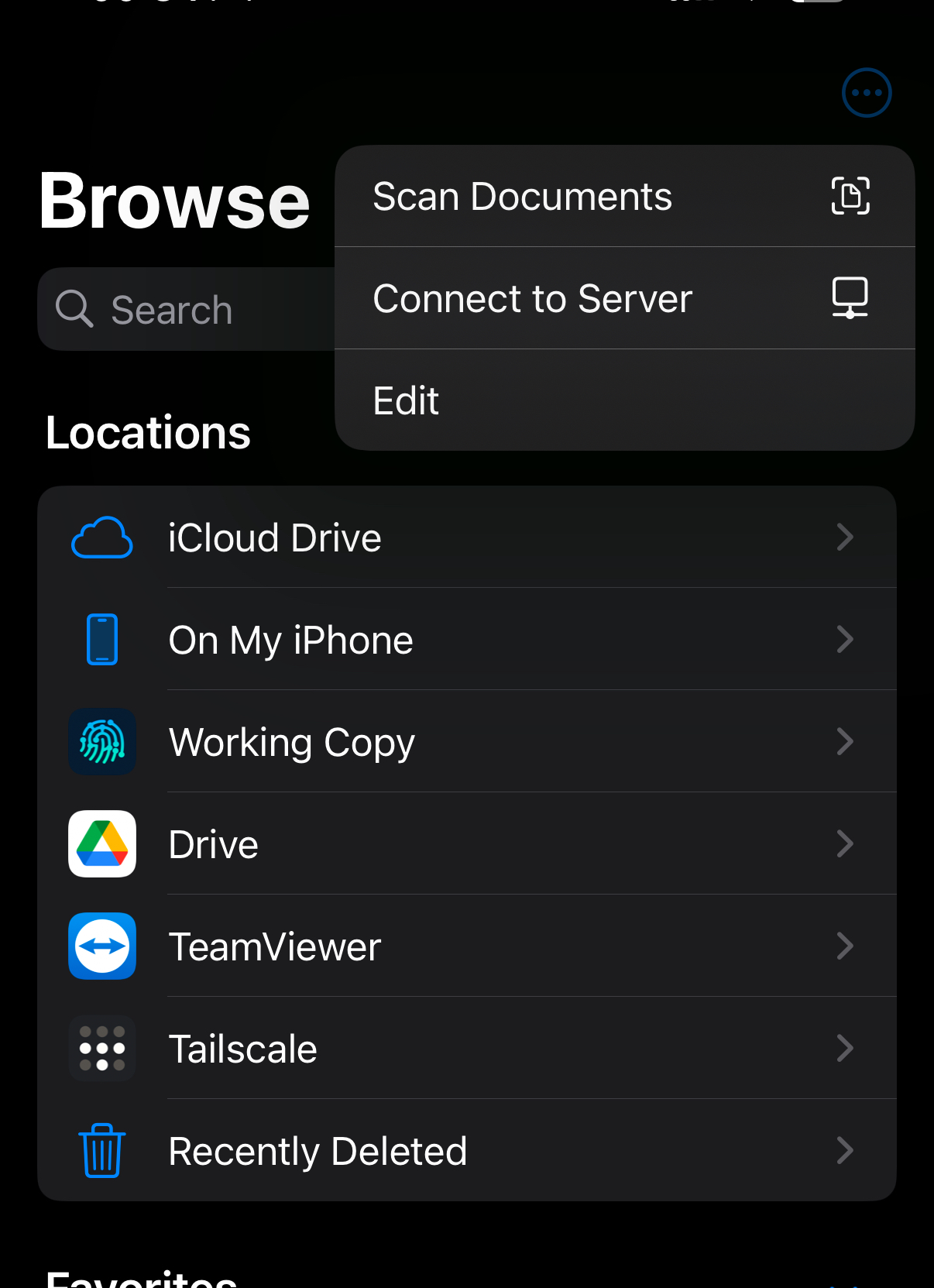
Enable SMB Sharing on Your Mac:
- Open System Preferences > Sharing.
- Check the box for File Sharing.

- Click info button to add the folder(s) you'd like to share and permissions.
- In the bottom left, click Options and enable SMB sharing.
-
Connect from Other Devices:
- On your other devices, use a file manager to connect to your Mac via SMB.
- For example, on an iPhone, you can use the Files app and click in the top right Connect to Server.
- On your other devices, use a file manager to connect to your Mac via SMB.
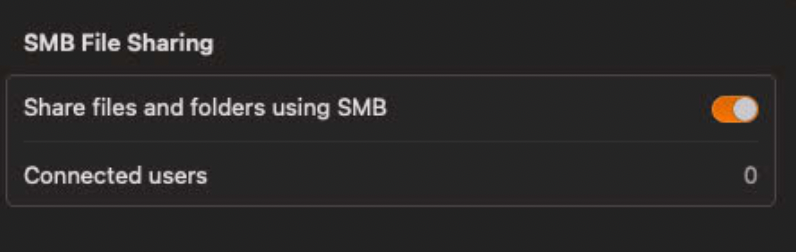
- Enter your Mac’s Tailscale IP address and credentials when prompted.
That’s it! Seriously. That easy.
You now have a secure, self-hosted cloud accessible from anywhere!
Performance Considerations
This setup excels at simplicity, but there are a few limitations to keep in mind:
- Large file transfers: Not ideal for massive files (e.g., video editing projects).
- However, you can add files directly to your filesystem and SMB will make them available to your other devices.
- Network speed: Your experience depends heavily on your internet connection.
- Ethernet for the win here. For the best performance, keep your server connected via Ethernet as it makes a real difference.
- Worth noting this is an issue with all self-hosted solutions for the most part - your home network will likely be the bottleneck.
- Large directories: Performance may degrade with directories containing hundreds of files.
- You can work around this by breaking up large directories into smaller ones.
- There are other solutions / workarounds as well if this is a problem for you.
Conclusion
After using this setup for [time period], I’m convinced it’s the perfect solution for my needs. Tailscale + SMB provides simple, secure file access across devices without the overhead of maintaining a full-fledged cloud storage platform. It’s reliable, lightweight, and easy to maintain—ideal for personal use.
For those who need more advanced features like web access, user management, or collaborative tools, platforms like Seafile or Nextcloud are worth exploring. But if you’re looking for something straightforward, this setup might be your new favorite tool.
Ready to ditch the complexity and embrace a simpler, more flexible solution for accessing your files? Give Tailscale + SMB a try!
Resources
If you’re curious about more built out solutions, check out these posts:
Comments
No comments available :/
Leave your thoughts! 💭
Tags
Cloud Storage
Self Hosting
Tailscale
Tips and Tricks

Version Unavailable
/
unavailable
Copyright 2026 © Naztech Inc. and Daniel Nazarian